Tuesday, February 16, 2016

Sqoop - Imported Data and Hive (Session 4)

Sqoop and Hive together form a powerful toolchain for performing analysis.

For example, there is data from a widget weblog (sales.log) in the following format

1,15,120 Any St.,Los Angeles,CA,90210,2010-08-01
3,4,120 Any St.,Los Angeles,CA,90210,2010-08-01
2,5,400 Some Pl.,Cupertino,CA,95014,2010-07-30
2,7,88 Mile Rd.,Manhattan,NY,10005,2010-07-18

Suppose we require data from both the sales.log and widget table to compute which zipcode is responsible for the most sales dollars.

3 step process
Create a hive table for sales.log

hive> CREATE TABLE sales (widget_id INT, qty INT, street STRING, city STRING, state >STRING, zip INT, sales_date STRING)
>ROW FORMAT DELIMITED FIELDS TERMINATED BY ',';

Ok

hive> LOAD DATA LOCAL INPATH "sales.log" INTO TABLE sales;
Ok

Sqoop can generate a hive table from an existing relational data-source.

% sqoop create-hive-table --connect jdbc:mysql://localhost/hadoopguide --table widgets --fields-terminated-by ','

Since we have already imported the widgets data into HDFS
hive> LOAD DATA LOCAL INPATH "widgets" INTO TABLE widgets;

Direct import into HIVE from Sqoop
The above 3-step process can be done directly using the below command

% Sqoop import --connect jdbc:mysql://localhost/hadoopguide  --table widgets -m 1 --hive-import

Compute the most profitable zip-code by querying hive tables

hive>CREATE TABLE zip_profits (zip INT, profit DOUBLE)
OK

hive>INSERT OVERWRITE TABLE zip_profits
SELECT s.zip, sum(w.price * s.qty) AS profit 
FROM sales s JOIN widgets w
ON s.widget_id=w.id
GROUP BY s.zip

hive> SELECT * FROM zip_profits ORDER BY profit DESC;

OK
90210  403.71
10005  28.0 
95014  20.0


Importing Large Objects
Depending upon large data objects are textual or binary, they are stored as CLOB or BLOB fields in database.
Sqoop can extract large objects from dbs and store them in HDFS.

Typically data is stored on disk like below. If large objects are also stored in the similar fashion, it will have adverse affect on performance
 Hence, generally databases store only a reference to this Large objects as shown below.
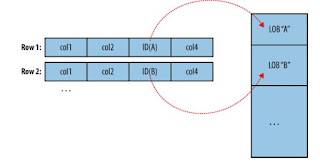
MapReduce typically materializes in memory every record before it passes to the mapper. Depending upon the size of the object, full materialization in memory may be impossible.

To overcome the above, Sqoop stores imported large objects in a separate file called a LobFile.
> Each record in a LobFile can store single large object (64-bit address space is used)
> This file format allows clients to hold a reference to the record without accessing its contents
> When content is access using java.io.Stream oor java.io.Reader

When a record is imported, the normal fields will be materialized together along with a reference to the LogFile where the CLOB or BLOB column is stored.

E.g suppose our widget table contains a CLOB field called schematic containing the exact schema diagram for each widget

2,gizmo,4.00,2009-11-30,4,null,externalLob(1f,lobfile0,110,50011714)
1f - file format
logfile0 - filename
110 - offset
50011714 - length inside the file

When working with record, Widget.getSchematic() will returrn a type of object CLOBRef (referencing the schematic column but not actual content)

The CLOBRef.getDataStream method actually opens the LobFile and returns an InputStream allowing to access its contents

The ClobRef and BlobRef classes caches references to underlying to LobFiles within a Map task.

Monday, February 15, 2016

How Sqoop Import Works - Session 3

Sqoop is written in Java like Hadoop. It imports a table from a database by running a MapReduce job that reads rows from the table, and writes the records to HDFS.


Sqoop uses Java DataBase Connectivity (JDBC) API to that allows application to access data stored in RDBMS.

Based on the URL in the connection string, Sqoop predicts which driver it should load. For cases, where Sqoop does not know which JDBC driver it should load, users can specify how to load the JDBC driver into Sqoop.


Sqoop client gets the metadata information. It then uses JDBC to examine a list of all columns and map them to MapReduce class field values e.g. for Widget class
public Integer get_id();
public String get_widget_name();
public java.math.BigDecimal get_price();
public java.sql.Date get_design_date();
public Integer get_version();
public String get_design_comment();

More critical to the import is the Serialization methods that form the DBWritableInterface.
Widget class implements DBWritableInterface (which allows the Widget class to interact with JDBC)
public void readFields(ResultSet _dbResults) throws SQLException
public void write(PreparedStatement _dbStmt) throws SQLException

JDBC ResultSet interface provides a cursor that retrieves records from a query.

readFields() -> populate the fields of the WidgetObject with columns from one row of the ResultSet’s data. 
Write()-> is used to allow sqoop to insert new widget rows into a table in Sqoop export.
Input format -> DataDrivenDBInputFormat -> read sections of a table from db, partitions a query over several map tasks

Reading a table is done with a simple query -> SELECT col1,col2,col3,... FROM tableName
Performance can be improved by using splitting column. Using metadata about the table, sqoop will guess the best splitting column (typically the primary key if it exists).

Example of splitting a query across multiple map tasks:
Suppose the widget table has 100,000 entries (with id column from 0 to 99,999). If we have 5 map tasks, DataDrivenDBInputFormat, will then generate:
SELECT id,widget_name… FROM widgets WHERE id>0 AND ID<20000,
SELECT id,widget_name… FROM widgets WHERE id>20000 AND ID<40000,
SELECT id,widget_name… FROM widgets WHERE id>40000 AND ID<60000,
SELECT id,widget_name… FROM widgets WHERE id>60000 AND ID<80000,
SELECT id,widget_name… FROM widgets WHERE id>80000 AND ID<100000,

The choice of splitting column is essential for efficiently parallelizing work. Users can specify a splitting column   when running an import job, to tune the job to data’s actual distribution.
If import job is run as single task (-m 1) then splitting is not performed.

Controlling the Import
Sqoop does not need to import the entire table at once. If rows upto 100,000 are already inserted, user can specif y a where clause (where id>100,000) to import only the new rows. User specified conditions are applied before the task-splitting is performed.

Imports and Consistency
Map tasks reading from a database in parallel are running in separate processes. They cannot share a single db transaction. So any updates to the rows of a table must be disabled during the Sqoop import.

Direct Mode Imports
Sqoop allows to choose from various different strategies for performing an import.
Some faster ways of import are also available other than the JDBC based sqoop import. e.g. MySQL mysqldump application can read from a table with greater throughput than a JDBC channel. But it cannot import large objects like CLOB and BLOB. To use direct mode imports, direct mode must be specifically enabled by the user using --direct argument. The metadata is still read using JDBC , even while using direct mode.

Sqoop Example - Session 2

Create hadoopguide in mysql

Mysql> CREATE DATABASE hadoopguide;
Mysql> GRANT ALL PRIVILEGES ON hadoopguide.* TO ‘%’@’localhost’;
Mysql> GRANT ALL PRIVILEGES ON haddopguide.* TO ‘’@’localhost’;

% mysql hadoopguide

Mysql> CREATE TABLE widgets(id INT NOT NULL PRIMARY KEY AUTO_INCREMENT,
                widget_name VARCHAR(64) NOT NULL),
                price DECIMAL(10,2),
                design_date DATE,
                version INT,
                design_comment VARCHAR(100));
MYSQL> INSERT INTO widgets VALUES (NULL, 'sprocket', 0.25, '2010-02-10', 1, 'Connects two gizmos');
MYSQL> INSERT INTO WIDGETS VALUES (NULL, 'gizmo', 4.00, '2009-11-30', 4, NULL);
MYSQL> INSERT INTO WIDGETS VALUES (NULL, 'gadget', 99.99, '1983-08-13', 13, 'Our flagship product');

mysql> quit;

Lets use Sqoop to import this table into hdfs

Sqoop import --connect jdbc:mysql://localhost:hadoopguide --table widgets –m 1

Sqoop import tool runs a MR job that connects to mysql db and reads the table. By default it runs 4 mappers in parallel creating 4 output files in the same dir.
Since we know that we are importing only 3 rows, we have specified to use only 1 mapper by using  -m 1, so we get a single file in HDFS.

% hadoop fs –cat widgets/part-m-00000
1,sprocket,0.25,2010-02-10,1,Connects two gizmos
2,gizmo,4.00,2009-11-30,4,null
3,gadget,99.99,1983-08-13,13,Our flagship product

The connect string jdbc:mysql//localhost:hadoopguide will read from a local database. Do not mention localhost, if the Hadoop cluster is used; specify the full hostname.

Generate code without import

% sqoop codegen --connect jdbc:mysql://localhost/hadoopguide --table widgets --class-name Widget


Codegen tool simply generates code without doing the full import. It generates a class Widget.java. If we are working with records imported to SequenceFiles, we have to work with generated code to de-serialize data from Sequence File storage. We can work with text based records without using generated code, but it can handle some tedious aspects of data processing for us.

Sqoop Basics - Session 1

Using Sqoop command

% Sqoop import --connect jdbc:mysql://localhost/databasename --username $username --password $password --table t1 --m 1
% Sqoop import --connect jdbc:mysql://localhost/testDb --username root --password hadoop123 -table t1 --m 1

Creating  a config file import.txt

import
--connect jdbc:mysql://localhost/databasename
--username root
--password hadoop123

Execute the sqoop import
S    % Sqoop –options-file /home/hduser/import.txt --table student –m 1
 % Hadoop dfs –ls –R student

3 files are generated (_Success, part-m-0000, _logs)

% Hadoop fs –cat /home/hduser/student/part-r-0000
Ø       1,Archana
Ø        2,XYZ
   Import all rows of a table in MySQL, but specific columns of the table
Sqoop import –connect jdbc:mysql://localhost/testDb --username hduser --password hadoop123 --table student --column “name” –m 1
   
   $ hadoop dfs -cat  /user/hduser/student/part-m-0000
       Archana
       Xyz
Importing multiple mysql tables into 1 hive/hbase table

MySql tables

Table A: “users” , columns: user_name, user_id, user_add, etc
Table B: “customers”, columns : customer_name, customer_Id, customer_add etc
Table C: “employees” , columns: employee_name, employee_id, employee_add etc

Importing into HIVE
Sqoop import –connect  jdbc:mysql:///myDb --username hue --password hue
--query “SELECT * FROM users JOIN customers ON users.user_id=customers.customer_id JOIN employees ON users.user_id=employees.employee_id
where $conditions –split-by oozie_job.id
--target-dir “/tmp/hue”
--hive-import --hive-table tableAll

Importing into HBASE
sqoop imort –connect jdbc:mysql///mydb –username hue –password hue
--query “SELECT 8 FROM user JOIN customers ON users.id=customers.id ON users.id = employees.id
WHERE $CONDITIONS
--SPLIT-BY oozie_job.id
--hbase-table hue –column-family c1

Sunday, February 14, 2016

Star Schema in Hadoop

A star schema is the simplest form of a dimensional model, in which data is organized into facts and dimensions.  A fact is an event that is counted or measured, such as a sale or login.  A dimension contains reference information about the fact, such as date, product, or customer. A star schema is diagramed by surrounding each fact with its associated dimensions.

Flat File Representation

Star Schema Representation


Data Load Process


Experiement1: Flat file vs Star Schema


Experiment 2 : Compressed Sequence Files

Structuring data properly in Hive is as important as in an RDBMS. The decision to store data in a sequence file format alone accounted for a performance improvement of more than 1,000%. The judicious use of indexes and partitions resulted in significant performance gains by reducing the amount of data processed.

For data architects working in the Hive environment, the good news is that many of the same techniques such as indexing that are used in a traditional RDBMS environment are applicable. For those of us who are familiar with MPP databases, the concept of partitioned data across nodes is very familiar.

The key takeaway is that we need to understand our data and the underlying technology in Hadoop to effectively tune our data structures. Simply creating a flat table or star schema does not result in optimized structures. We need to understand how our data is distributed, and we need to create data structures that work well for the access patterns of our environment. Being able to decipher MapReduce job logs as well as run explain plans are key skills to effectively model data in Hive. We need to be aware that tuning for some queries might have an adverse impact on other queries as we saw with partitioning.

* This holds true only for HIVE (not HBase)

(Excerpts from research on Data modeling in Hadoop(Hive) with Star Schema)
(References: data-modeling-hadoop.pdf, http://searchdatamanagement.techtarget.com)

Tuesday, January 26, 2016

Learning Scala - Session 5 - Case Class & Singleton

Case class in Scala

- Creates an object without using new


package com.first

case class Person(lastname:String, firstname: String, age:Int) {

  println(s"Person is $firstname $lastname, age is $age")
}

object PersonObj extends App{

  val person1 = Person("Shree","Anita",30)
  val person2 = Person("Kumar", "Saahil", 30)
  val person3 = person1.copy(firstname="Shilpa",age=29)
}

Output

Person is Anita Shree, age is 30

Person is Saahil Kumar, age is 30
Person is Shilpa Shree, age is 29 (output)

When you declare a case class the Scala compiler does the following for you:
    • Creates a class and its companion object.
    • Implements the apply method that you can use as a factory. This lets you create instances of the class without the new keyword. E.g.:
    • Prefixes all arguments, in the parameter list, with val. This means the class is immutable, hence you get the accessors but no mutators. 
    • Adds natural implementations of hashCodeequals and toString. Since == in Scala always delegates to equals, this means that case class instances are always compared structurally
    • Generates a copy method to your class to create other instances starting from another one and keeping some arguments the same. E.g.: Create another instance keeping the lastname and changing firstname and age:
    • val person3 = person1.copy(firstname="Manu",age=29)
    • Person is Manu Shree, age is 29 (output)
    • Please refer http://www.alessandrolacava.com/blog/scala-case-classes-in-depth/ for in depth details on case class
Implementing Singleton in Scala
When you replace the keyword class by object, you define a singleton object. A singleton definition defines a new type like a class does, but only one single object of this type can be created—therefore the name "singleton".

Singleton.scala

object Singleton {

  println("Creating Singleton Object")


  var sum = 0;
  def add(num:Int){

    sum += num

      println(s"Sum =$sum")

  }

}


Main.scala
object Main extends App{
  Singleton.add(10)
  Singleton.add(5)
  Singleton.add(20)
}

Output
Creating Singleton Object

Sum =10

Sum =15

Sum =35


The definition will create an object of this type, and assign the name MySingleton to it. The construction of the object happens the first time the object is used (so if you define a singleton and never use it, it will not be constructed at all).

You can define both a class and a singleton object with the same name. In this case, the singleton is called the companion object of the class. A companion object is allowed to use the private fields and private methods of a class.
